Video campaigns
Pay creators for the views their videos get, with UGC Videos and Clipping.
A video campaign pays creators for reach. They post videos about your business on their own Instagram or YouTube accounts, and you pay for the views those videos get, at a rate you set per 1,000 views. You check every video before it earns anything, and you add the money up front, so you always know the most a campaign can cost you.
There are two kinds:
| Kind | What creators do | Good for |
|---|---|---|
| UGC Videos | Film their own original video about your shop or product. | Fresh content in creators' own voices, made for their audience. |
| Clipping | Cut short clips from videos you already have and post them. | Getting more out of videos you've already made, such as a launch film, a podcast or a founder interview. |
Both pay the same way and are set up and reviewed the same way. Pick one under Campaign Hub › Campaigns › New campaign. They're in the Get seen online group.
Set up the campaign
What to make
- Type: UGC or Clipping.
- Category: what the videos are about, such as products, personal brand or entertainment.
- Platforms: where creators post. Views are counted on Instagram and YouTube.
- Guidelines: what you'd like to see, for example "show the product in action". Optional.
- Requirements: what every video must do, for example "mention our brand name". You can turn down videos that don't.
- Briefs: attach one or more briefs to give creators the full picture: the idea, what to include and what to avoid.
How you pay
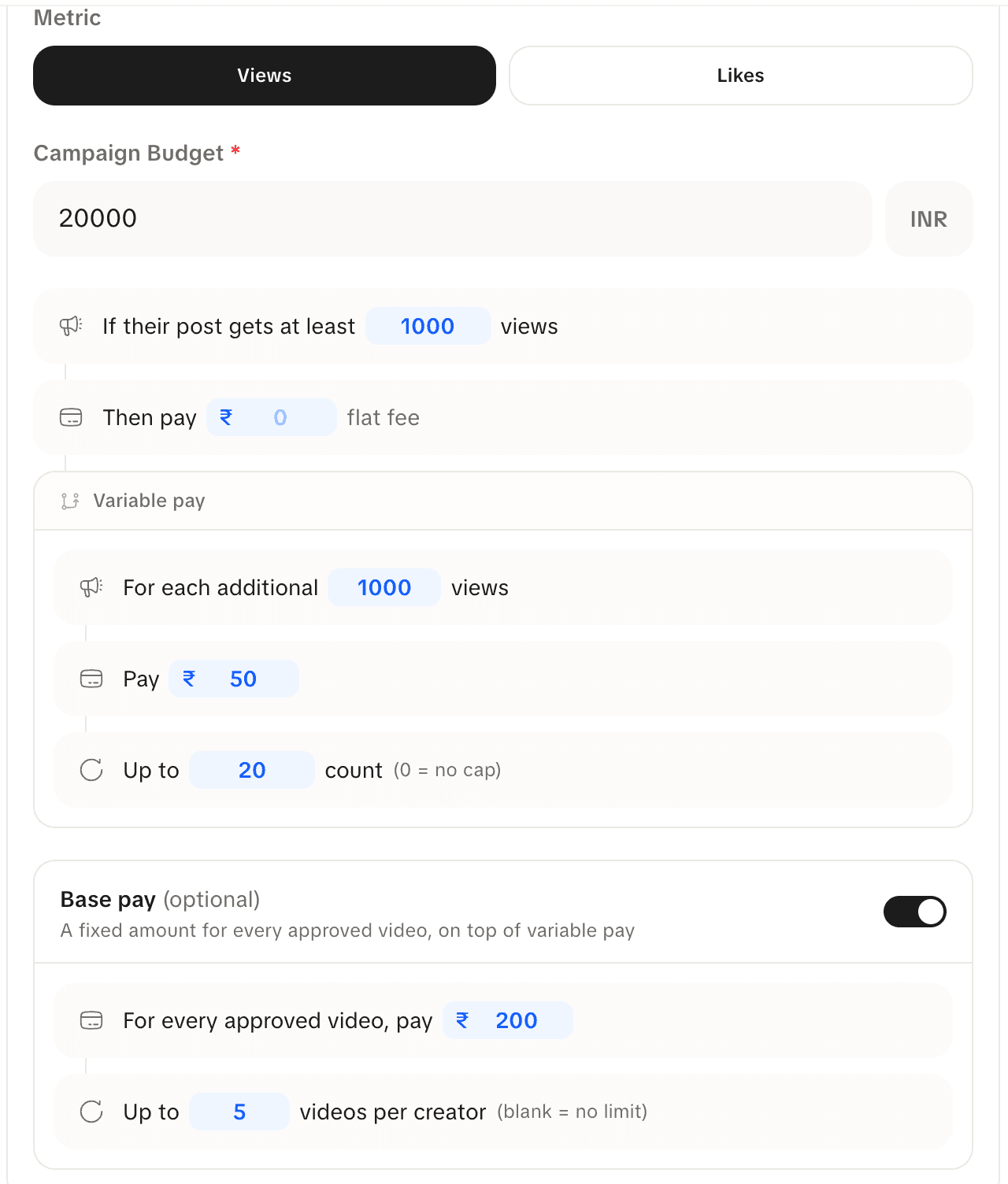
Open How you pay and choose what counts: Views or Likes. Then fill in the sentences:
- If their post gets at least N views, then pay a flat fee. This is the first payment, and it only comes once a video reaches that number. A video that never gets there earns nothing.
- For each additional N views, pay an amount. This is your rate per 1,000 views (or whatever step you choose), on top of the flat fee.
- Up to a number of steps. This caps what one video can earn. Leave it at 0 for no cap: the video keeps earning until the campaign ends or its money runs out.
Base pay is optional. Switch it on to pay a fixed amount for every video you approve, whatever its views. You can limit how many videos per creator get base pay.
Campaign budget is the total you're putting in. It's the most the campaign can pay out.
An example
A new campaign starts on these numbers: no flat fee, then ₹50 for each 1,000 views after the first 1,000, up to 20 steps. Leaving base pay aside, a video earns:
| Views | Earned |
|---|---|
| 800 | ₹0 (not at 1,000 yet) |
| 1,000 | ₹0 (the flat fee is ₹0) |
| 5,000 | 4 × ₹50 = ₹200 |
| 50,000 | 20 × ₹50 = ₹1,000 (the cap) |
With a ₹20,000 budget on a paid plan, that covers 19 videos that hit the cap, once the 3.5% payout fee is added (₹1,000 + ₹35 each). Most videos won't reach the cap, so the budget usually goes further. Set a flat fee if you want to reward a video for reaching the first mark.
Who can join
- Everyone: any creator on Loopearn can post.
- A group: only people in a group you pick.
- Specific people: only creators you name.
Unless you name specific people, also choose where the campaign runs:
- IRL: creators come to your shop, or to another place you pick, to film. They see the campaign when they're in that city.
- Remote: creators film from anywhere, for example a Clipping campaign or a product you ship.
You can't change this once the campaign is live.
Add the money
The campaign goes live once its budget is in. You can pay from your wallet. Loopearn's payout fee is charged on top of what creators earn, out of the campaign's budget, and only when a creator is actually paid. It's 3.5% on paid plans and 10% on Starter. Creators always get the full amount. Money that isn't earned goes back to your wallet when the campaign ends.
Review videos
Creators post on their own accounts, then send the link to your campaign. Open the campaign and go to Videos to review. A to review count on the Campaigns list tells you when there's something waiting.
| Tab | What's in it |
|---|---|
| To review | New videos waiting for you. |
| Held | Videos Loopearn's checks flagged as suspicious: views far above what this creator usually gets, more views than their audience could explain, or likes that don't match the views. See Fraud checks. |
| All videos | Everything posted to the campaign. |
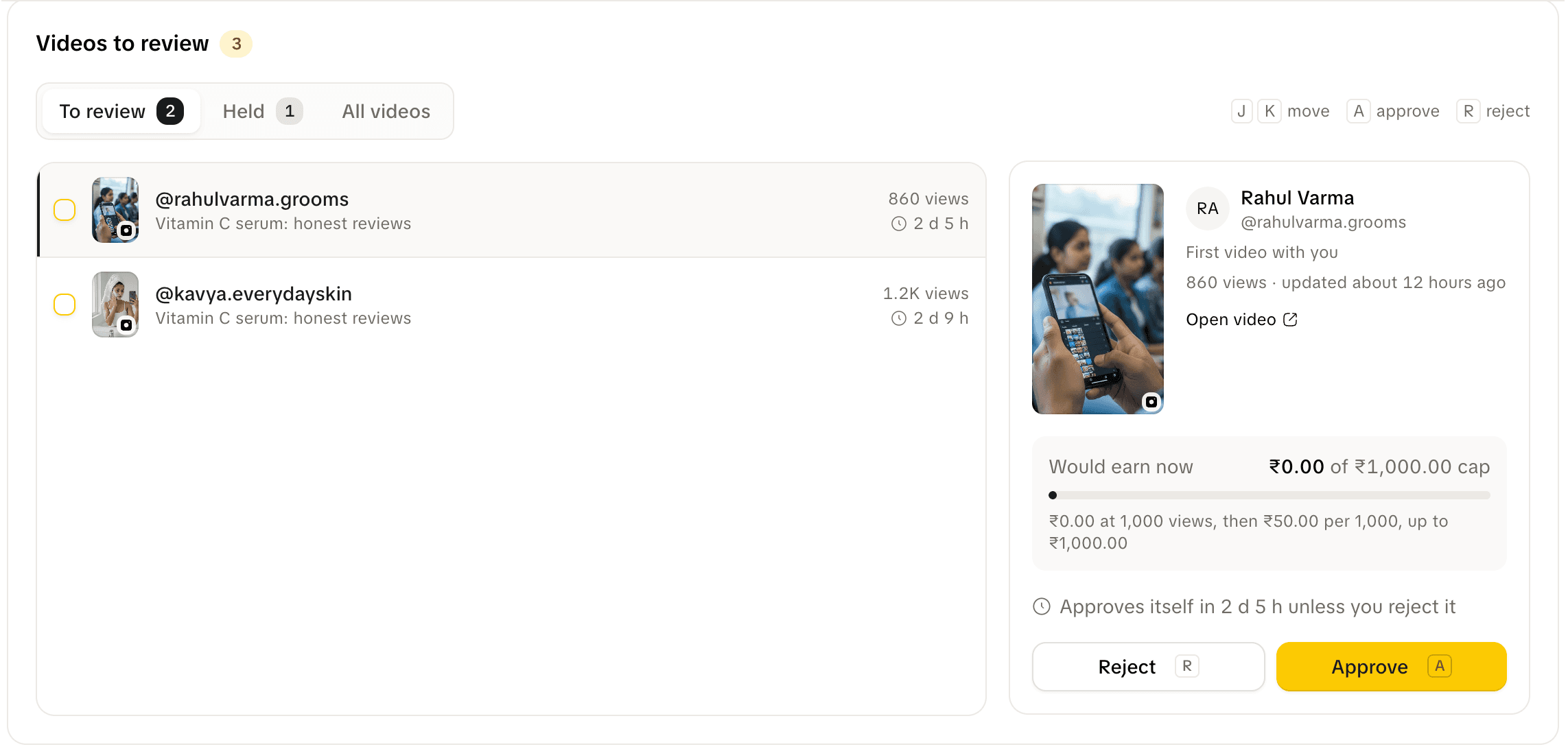
Each video shows the creator, how many videos of theirs you've approved before, its current views, and Would earn now, which is what it would earn if you approved it today.
- Approve: the video starts earning from its views. If you set base pay, that's earned straight away. A held video says Approve anyway.
- Reject: pick a reason (doesn't follow the brief, posted outside the campaign dates, already submitted, link or video doesn't work, or something else) and add a note. The creator sees exactly what you write. A note is required for "something else".
For 10 seconds after you decide, Undo takes it back. The creator is only told once that time is up.
Short on time? A clean video in To review approves itself after 3 days if you don't get to it. Each video shows how long it has left. Held videos never approve themselves. They wait for you.
How views turn into pay
Once a video is approved, Loopearn keeps checking its views and works out its earnings again every day. As views go up, what it has earned goes up, and that amount comes out of the campaign's budget. You can see Earned so far and Sent to creator on each video.
A video stops earning when:
- it reaches the cap you set,
- the campaign ends,
- the campaign's money runs out, or
- the creator deletes it or makes it private, and it stays down for 3 days. It shows as Taken down.
What it earned up to that point stays the creator's.
Things to know
- Views are counted, not promised. You pay for views a video actually gets, measured on the platform. A video with no views costs you nothing beyond any base pay.
- Likes campaigns work the same way, counting likes instead of views.
- Your budget is the limit. A campaign never pays out more than you put in. When the money is gone, approved videos stop earning.
Need help? Email support@loopearn.com